
Flash video player
The VideoPress Flash video player provides video playback, subtitle overlays, stats tracking, and embed sharing functionality through a AS3 SWF. This document outlines specific functionality of the player and its feature requirements.
Video files available for playback are MP4 with H.264 video (Base L3.0 or High L4.5) and AAC–LC audio.

Runtime
The SWF receives runtime arguments through FlashVars specifying a unique video identifier, height and width of the requested DOM container, the DOM ID of the parent container, an upscale preference, a possible seek value defined in whole seconds, an autobuffer preference and an autoplay preference.
SWF should collect page context information including the document URI, actual height and width of the parent container identified by the passed DOM ID, and the currently installed version of Flash player. VideoPress requires Flash 9.0.115 (“MovieStar”) or greater. An express install SWF is located within the same directory as the video player for easy Flash Player upgrades if supported by the client.
SWF extracts run-time variables and requests XML metadata from the VideoPress server for the given video identifier.
Metadata extraction
The VideoPress XML metadata file contains all essential information needed to customize the Flash player for video playback.
Example: http://v.wordpress.com/wp-content/plugins/video/video-xml.php?guid=OO4thna8
Private vs. Public files
Videos marked as private by publishers should receive additional processing and verification before on-screen playback. Private videos are flagged by the is_private element with a boolean element value (0 for false, 1 for true).
If a video is marked as private the XML metadata file will contain an allowed_embed_sites element with a comma-separated list of URI hostname values. Base values include the VideoPress SWF domain (v.wordpress.com), the video’s parent blog (blogval.wordpress.com), mapped custom domains associated with the parent WordPress.com blog, and custom white-listed hostnames supplied by the publisher.
If a video is marked as private and the hostname of the rendered page context does not match a hostname provided in the XML metadata’s list of allowed embed sites the player should halt processing and instead display an embed not permitted error frame.
Ratings
VideoPress uses CARA ratings to communicate the age-appropriateness of video content. Content rated R or X must display an age gate before buffering or playing video content. An age selector testing >17 for R and >18 for X is sufficient.
Video files
MP4 video files (H.264 video, AAC audio) are available in multiple configurations dependent on the size of the playback container and available bandwidth to the client computer. Video sizes are calculated based on video width with a maximum allowed height to maintain the original aspect ratio of the uploaded video.
- 480px
- Base & High. 900 kbps video, 128 kbps audio
- 640px
- High. 1400 kbps video, 128 kbps audio
- 1280px
- High. 3000 kbps video, 160 kbps audio
Video title and summary text are available in the XML metadata file when defined by the user. The title should be present on the video overlay component while video playback is inactive.
Video duration, defined as total seconds available in the video track, is defined in the metadata field. This value should be converted to mm:ss format for display alongside the video scrubber.
Poster frame
Each video file resolution has a separate poster frame JPG matching the video’s dimensions. The poster frame should be loaded into the SWF to serve as a preview for the video content before the video content has been loaded from the network.
Embed codes
Embed codes, if present, indicate the publisher would like to easily facilitate the sharing of videos through pre-configured embed markup and WordPress shortcakes. The VideoPress XML includes two pre-configured embed elements for playback at 480px (embed_code) or 640px (large_embed_code). VideoPress also advertises a special shortcode for WordPress.com publishers or self-hosted WordPress publishers with the VideoPress plugin installed.
Player skin
VideoPress customers may customize the SWF player by specifying a custom hex color triplet or transparent overlay logo (PNG or GIF).
The custom hex color triplet should be applied to the background of the top and bottom action bars inside the video player.
The custom logo should be displayed in the bottom right on the overlay frame displayed when playback is inactive. A file request timeout of 5 seconds or less is acceptable.
Subtitles
VideoPress files may, on rare occasions, have associated timed text transcripts. Transcripts are currently stored on the dotSUB website for community collaboration across multiple languages.
Subtitles within the video player are off by default. Subtitle availability is indicated by the presence of the dotsub_metadata element within the video’s XML metadata file. dotsub_metadata element value is a dotSUB metadata URI unique to the video’s publisher and his unique video identifier.
The dotSUB service returns a JSON object. Inside the JSON object is a languages object array with a ISO 639-3 key string for each language. The languageNameLocalized property contains the user-facing transcript text for display in the video player’s subtitle selection control.
Transcript files are described in JSON with a captions object array. Each caption indicates when to start displaying the text overlay, when the overlay should stop, and the text content to display (localized to the language’s character set).
Video playback
Video should only be downloaded when a viewer initiates a playback action on the SWF (e.g. play button, play target on video overlay). The SWF player should accept autobuffer, autoplay, and seek parameters to override this default behavior.
Loading progress
Video download and loading progress should be reflected in the scrubber bar.
Progressive download
The appropriate MP4 video file is progressively downloaded from the VideoPress CDN. The progressive network loader should request one byte Range at a time from the playback start point (typically 0) until the download has completed. The SWF Player should recognize/estimate when a progressive download has enough video content to initiate smooth playback until the end of the video.
Direct seek
A viewer might directly seek to a given offset in the video defined in seconds based on a passed-in parameter or through a SWF interaction such as a scrubber click. Directed navigation to a specific point in the video should change the progressive download to the new seek point. The seek behavior would start the download at a new Range, loading the last video from the seek point to the end of file before loading the start of file to seek point.
Quality boost
VideoPress offers viewers the ability to load a higher-resolution video than we recommend inside the video player dimensions (when a higher-resolution video is available). This feature is currently exposed through a HD on/off toggle on the top-right side of the player. When the toggle is engaged the player should load the newly requested video at the seek settings of the current state of video playback (if video is 30 seconds in, new video should begin playing at 30 seconds as well).
Full screen mode
The SWF should include a full-screen toggle for video playback. When clicked the full-screen mode should ideally be aware of the full-screen resolution and load the highest quality video available for the given screen resolution (e.g. 1280 pixel width video for a 1900 pixel width screen) advanced to the current playback seek point.
Sharing features
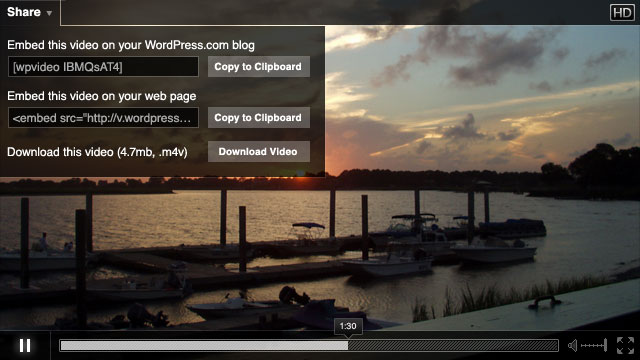
The SWF should display an embed drop-down menu with selectable text fields when a video is non-private and contains embed information in the XML metadata. A text field displaying embed markup may be selected by the viewer and easily copied to the clipboard through an adjacent copy helper.
Subtitles
The subtitles control is present if the video’s XML feed contains a dotsub_metadata element and the SWF was able to successfully unpack one or more language references at runtime. Language options displayed in the drop-down should place the viewer’s home language first, followed by an alphabetical display of the languageNameLocalized property.
Transcript files are retrieved from the dotSUB servers by appending the ISO 639-3 language string to the end of the URI value supplied in the XML metadata dotsub_caption element. Timings described by the returned dotSUB JSON should trigger text overlay values at the bottom of the SWF but above any controls if present.
Skins
Publishers may customize the background color of player controls and the logo displayed on a movie’s overlay frame. The SWF should accept these customization parameters as described by the XML metadata.
Statistics
The SWF sends remote resource requests to WordPress.com and other stats servers to track video interaction statistics. We specifically track:
- Loaded
- When the SWF has successfully loaded playback functionality and poster frame onto the page and is available for playback.
- Played
- When a playback action occurs.
- Quartile
- Video playback crosses the 25%, 50%, and 75% duration threshold.
- Completed
- Video playback at 100%, splash frame displayed.
Statistics are tracked via requests to remote beacons (WordPress.com stats, Quantcast) with specific data requested by each platform for each action. SWF player binds to statistics packages through included AS3 libraries for beacon construction per action.
Advertising
Future versions of the VideoPress Flash player will include support for in-player advertising.
- Linear video
- Advertising content loaded before and after the main video within the dimensions of the video player container.
- Linear interactive
- A custom frame at the end of video play displaying content from an advertising partner within the dimensions of video playback.
- Overlay
- 50 pixel height ad unit only available if video player height is greater than 350 pixels. Ad unit is JPG or PNG content at 300×50 or 450×50 depending on the size of the video container.
